Choose Macrows when
Your spreadsheet is really a database.
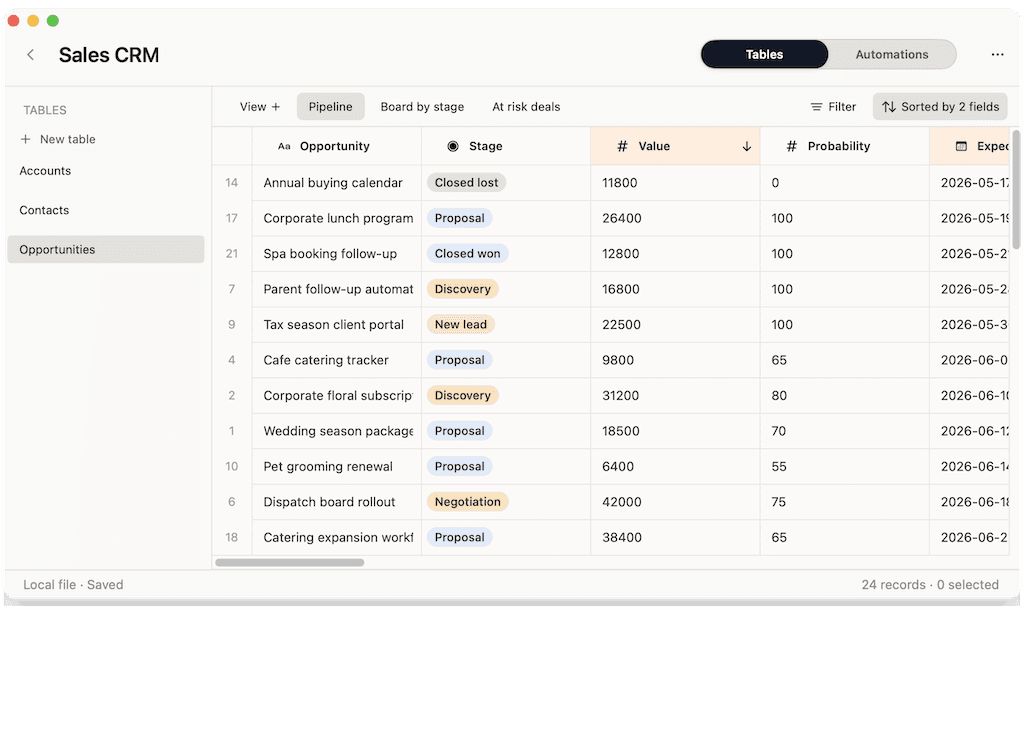
You track clients, projects, inventory, or research and need fields, linked records, views, and row actions, not another tab of formulas.
Excel alternative for Mac
Excel is a powerful spreadsheet for heavy calculation and analysis. Macrows is a native Mac app for turning spreadsheets into structured, private databases — linked records, views, and row actions — without a Microsoft 365 subscription.
Choose Macrows when
You track clients, projects, inventory, or research and need fields, linked records, views, and row actions, not another tab of formulas.
Choose Excel when
Pivot tables, complex formulas, financial modeling, and large-scale number crunching are where Excel stays unmatched.
Quick verdict
Excel is the right tool for calculation and modeling. Macrows is better when the spreadsheet is really a tracking system that needs structure, privacy, and Mac-native speed.
Pick Macrows if
CRMs, trackers, inventory, and research are about records and relationships, where a database beats a formula grid.
Pick Excel if
Forecasts, pivots, and large analytical workbooks are Excel's home turf.
The honest answer
Keep Excel for analysis and modeling. Use Macrows for the tracking systems your spreadsheets quietly turned into.
Why Macrows can be better
Macrows adds fields, linked records, saved views, lookups, and row actions, so a tracking spreadsheet becomes a real system instead of a fragile sheet of tabs.
Excel is part of paid Microsoft 365 plans. Macrows is free for local use with no account required to start.
Your data stays on your Mac. No cloud workspace, no sign-in, and no upload before you can start.
Clean rows, summarize records, and extract data with on-device AI, with no add-ins and no metered cloud calls.
Feature comparison
Excel is built for calculation. Macrows is built for structured, private tracking that grows out of a spreadsheet.
| Feature | Macrows | Excel |
|---|---|---|
| Best at | Structured databases from spreadsheets | Calculation, modeling, and analysis |
| Data model | Fields, linked records, views, row actions | Cells, formulas, and pivot tables |
| Native Mac app | Yes, built for macOS | Yes, via Microsoft 365 |
| Price | Free for local use | Microsoft 365 subscription |
| Account required | No account to start | Microsoft account / license |
| Works offline | Yes | Yes, with a desktop license |
| Built-in AI | On-device, unmetered | Copilot, paid add-on |
| Linked records | Yes, native | Manual with lookups / Power Query |
| Import / export | Excel and CSV import | Native XLSX, CSV, and more |
| Best for | CRMs, trackers, inventory, research | Financial models and heavy analysis |
Detailed comparison
Excel thinks in cells and formulas; relationships are something you fake with lookups and extra tabs. Macrows thinks in records and fields, with native linked records, saved views, and row actions, so a tracker stays clean as it grows.
Excel for Mac comes with a paid Microsoft 365 plan or license. Macrows is free for local use with no account, so there is nothing to subscribe to before you start.
Macrows keeps local projects on your Mac by default. Your files do not need to live in OneDrive or a cloud workspace for the app to be useful.
Choose Excel for serious calculation, pivot tables, and financial modeling. Choose Macrows when the spreadsheet is really a tracking system that needs database structure, privacy, and Mac-native speed.
Best use cases
Track clients, deals, and follow-ups as linked records instead of rows of formulas.
Connect products, vendors, locations, and reorder status with fields and views.
Turn a status sheet into linked records, owners, deadlines, and row actions.
Use Excel for forecasts, scenarios, and formula-heavy financial models.
Use Excel when the job is pivot tables and slicing large numeric datasets.
Use Excel for heavy calculation, charts, and analysis add-ins.
Pricing and ownership
Excel for Mac is part of paid Microsoft 365 plans. Macrows is free for local use, with paid plans planned for advanced automations, sharing, sync, and premium AI.
| Topic | Macrows | Excel |
|---|---|---|
| Solo use | Free for local projects, no account. | Microsoft 365 Personal, about $70/year. |
| Business use | Paid plans planned for automations, sharing, and sync. | Microsoft 365 Business, per user/month. |
| Ownership | Files stay on your Mac. | Files stored locally or in OneDrive. |
Microsoft 365 pricing was reviewed in June 2026 from Microsoft 365 plans.
Switching from Excel
Keep Excel for the workbooks that are about math. Move the ones that are really tracking systems to Macrows.
FAQ
Macrows is a good Excel alternative for Mac users whose spreadsheets are really tracking systems: CRMs, trackers, inventory, and research. It adds database structure that Excel handles only manually. Excel remains better for calculation, pivot tables, and modeling.
Use Macrows when the spreadsheet is about records and relationships rather than math. It gives you linked records, saved views, and row actions natively, runs as a fast native Mac app, and is free for local use with no subscription.
Yes. Macrows is free for local use with no account, while Excel for Mac requires a paid Microsoft 365 plan or license. Paid Macrows plans are planned for advanced automations, sharing, sync, and premium AI.
Macrows can replace Excel for a CRM, inventory tracker, or project tracker that has outgrown a formula grid. It keeps records clean with fields and linked records. Keep Excel when the same workbook also needs heavy calculation.
Yes. Macrows imports Excel and CSV files, so you can bring an existing workbook in and keep editing in a familiar grid before adding structure.
Yes. Excel is still the better tool for financial modeling, pivot tables, complex formulas, and large-scale numeric analysis. Macrows is for the tracking systems your spreadsheets turned into.
Bottom line
Import your workbook into Macrows and give the tracking work the structure, privacy, and Mac speed it deserves.