Choose Macrows when
Your sheet has quietly become a database.
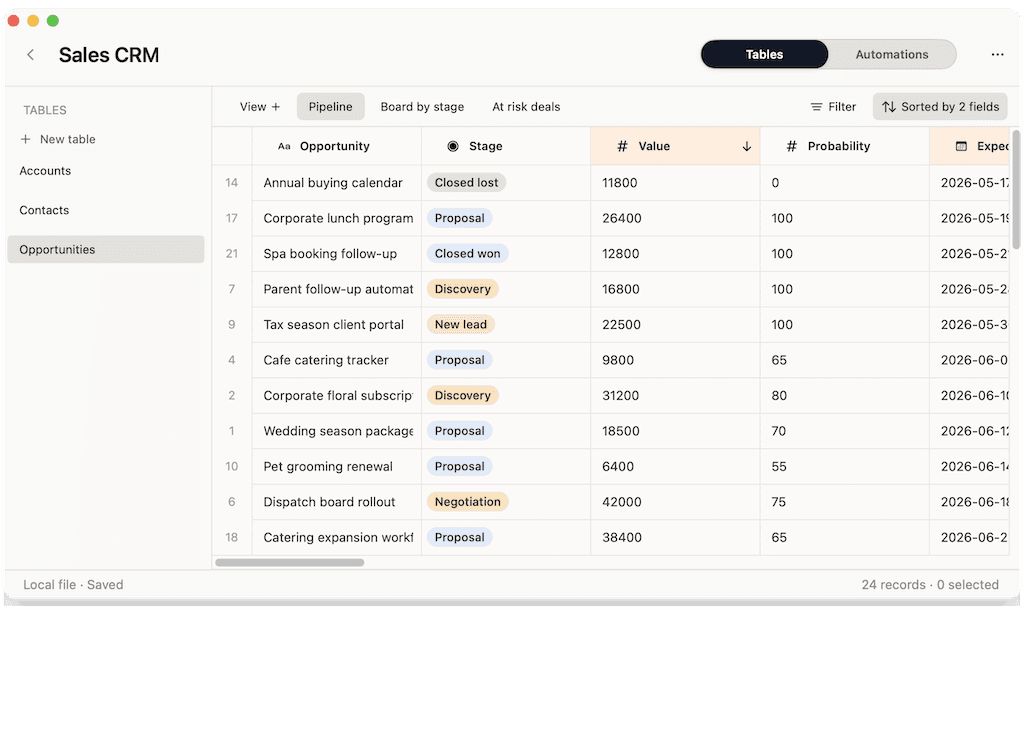
You need linked records, fields, saved views, and row actions, and you want the work to stay on your Mac instead of in a shared cloud document.
Google Sheets alternative for Mac
Google Sheets is a free spreadsheet that lives in your browser and Google's cloud. Macrows is a native Mac app that keeps the spreadsheet feel, adds database structure, and keeps your data on your device.
Choose Macrows when
You need linked records, fields, saved views, and row actions, and you want the work to stay on your Mac instead of in a shared cloud document.
Choose Google Sheets when
Many people editing the same sheet at once, from anywhere, with comments and sharing links, is exactly what Google Sheets does best.
Quick verdict
Google Sheets is unbeatable for free cloud collaboration. Macrows is better when the spreadsheet holds private data and needs database structure on your Mac.
Pick Macrows if
Client lists, research, lead lists, and trackers are often too sensitive to keep in a shared cloud document.
Pick Google Sheets if
Shared budgets, signup sheets, and group planning thrive on free real-time editing in the browser.
The honest answer
Keep Google Sheets for shared, throwaway, or collaborative sheets. Move the private, structured work to Macrows.
Why Macrows can be better
Google Sheets stores everything in Google's cloud. Macrows is local-first, so private records, notes, and customer data stay on your Mac until you choose to share them.
Use fields, saved views, linked records, lookups, and row actions when a flat grid stops being enough, without leaving the spreadsheet feel.
No connection required. Open the app and edit instantly, with no browser tab, no sign-in, and no sync spinner.
Native keyboard-driven editing and fast scrolling, instead of a web app fighting for memory in another tab.
Feature comparison
Google Sheets is built for shared cloud editing. Macrows is built for private, structured work that should live on your Mac.
| Feature | Macrows | Google Sheets |
|---|---|---|
| Where data lives | On your Mac, local-first | In Google's cloud |
| Works offline | Yes — full editing | Limited offline mode |
| Account required | No account to start | Google account required |
| Native Mac app | Yes | No — browser based |
| Real-time collaboration | Planned for shared projects | Yes — core strength |
| Database structure | Fields, views, linked records, row actions | Flat grid; structure is manual |
| Built-in AI | On-device, unmetered | Gemini features, cloud and metered |
| Import / export | CSV import, Excel export | CSV, XLSX, and more |
| Pricing | Free for local use | Free with a Google account |
| Best for | Private, structured spreadsheet databases | Free real-time cloud collaboration |
Detailed comparison
Every Google Sheet lives in Google's cloud and is tied to an account. Macrows keeps local projects on your Mac, so sensitive client, research, and operations data never has to be uploaded before you can work with it.
A Google Sheet is a flat grid; structure like relationships and views is something you build by hand with tabs and formulas. Macrows adds fields, saved views, linked records, lookups, and row actions so a sheet can become a real system.
Google Sheets needs the browser and works best online. Macrows is a native Mac app that opens instantly and edits fully offline, with keyboard-driven speed and no tab to keep alive.
Choose Google Sheets when you need free real-time collaboration with many people in the browser. Choose Macrows when the spreadsheet holds private data, needs database structure, and should run fast and local on your Mac.
Best use cases
Track clients, deals, and follow-ups as linked records on your Mac instead of a shared cloud tab.
Import sources, tag records, and keep sensitive research on your own machine.
Clean, enrich, and act on a private lead list with fields and row actions instead of a flat sheet.
Use Google Sheets when several people need to edit the same budget in real time from anywhere.
Use Google Sheets for quick signup or planning sheets shared with a link.
Use Google Sheets for a fast, disposable calculation you do not need to keep or structure.
Pricing and ownership
Google Sheets is free with a Google account and part of paid Google Workspace plans for business. Macrows is free for local use, with paid plans planned for advanced automations, sharing, sync, and premium AI.
| Topic | Macrows | Google Sheets |
|---|---|---|
| Solo use | Free for local projects, no account. | Free with a Google account. |
| Business use | Paid plans planned for sharing, sync, and advanced automations. | Included in Google Workspace, from about $6 per user/month. |
| Ownership | Data stays on your Mac. | Data stored in Google's cloud. |
Google Workspace pricing was reviewed in June 2026 from Google Workspace pricing.
Switching from Google Sheets
You do not need to leave Google Sheets entirely. Move the sheets that hold private data or have outgrown a flat grid.
FAQ
Macrows is a good Google Sheets alternative for Mac users who want a private, local, structured spreadsheet. It keeps the spreadsheet feel but adds database structure and keeps data on your device. Google Sheets is still better for free real-time collaboration in the browser.
Use Macrows when the spreadsheet holds private data, needs database structure like linked records and saved views, or should run as a fast native Mac app that works offline without a Google account.
Yes. Macrows is a native Mac app, so local projects open instantly and edit fully offline, unlike Google Sheets, which is built around the browser and works best online.
Macrows can replace Google Sheets for a personal CRM or client tracker that mostly lives on one Mac, with fields, linked records, and row actions. Google Sheets is better when many people need to edit the same CRM in real time.
Macrows is free for local use with no account. Paid plans are planned for advanced automations, sharing, sync, and premium AI. Google Sheets is free with a Google account and part of paid Google Workspace plans.
Yes. Download a Google Sheet as CSV, then import it into Macrows and keep editing in a familiar grid before adding structure.
Bottom line
Download a sheet as CSV, import it into Macrows, and turn it into a fast, private database on your Mac.