Choose Macrows when
The work starts as a spreadsheet.
You think in rows, columns, and formulas, and you want database structure without rebuilding the work as pages and blocks.
Notion alternative for Mac
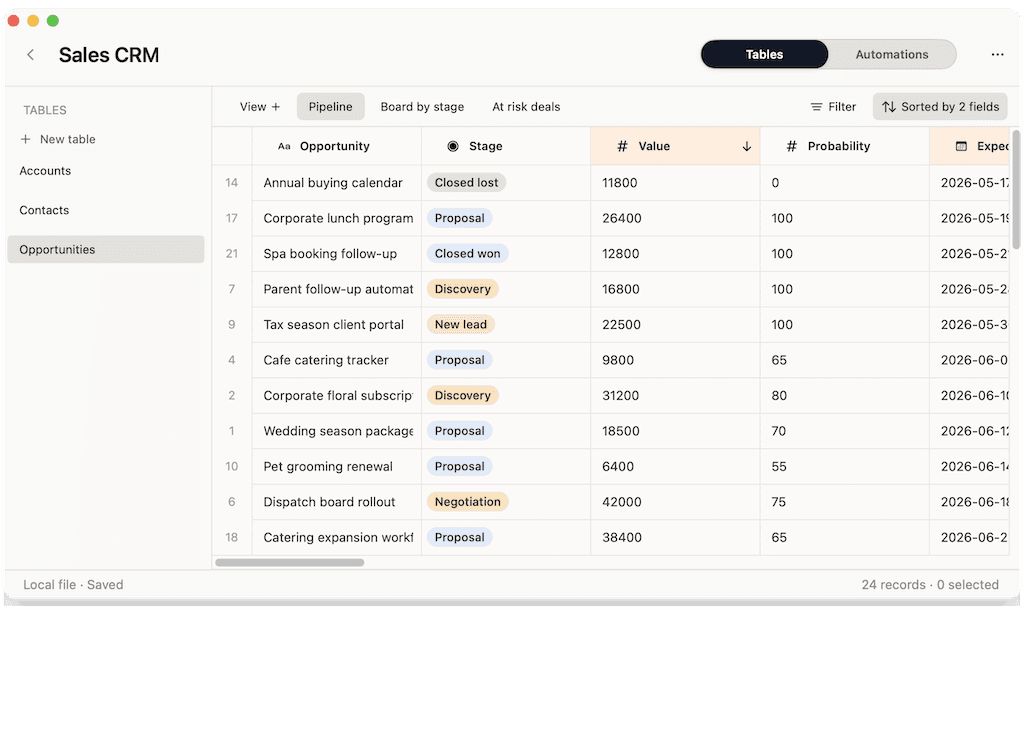
Notion is a cloud workspace for docs, wikis, and databases. Macrows is a native Mac app that starts as a spreadsheet and grows into a private, local database — without a cloud workspace or per-seat fees.
Choose Macrows when
You think in rows, columns, and formulas, and you want database structure without rebuilding the work as pages and blocks.
Choose Notion when
Notes, documentation, and connected pages with embedded databases are exactly what Notion is built for.
Quick verdict
Notion is a strong docs-and-database workspace. Macrows is better when the work starts in a spreadsheet, holds private data, and should stay fast and local on your Mac.
Pick Macrows if
CRMs, trackers, and research data that started in a grid feel more at home in Macrows than in Notion pages.
Pick Notion if
Wikis, notes, project docs, and shared knowledge are where Notion shines.
The honest answer
Notion leads with documents. Macrows leads with the spreadsheet. Pick the one that matches how the work actually starts.
Why Macrows can be better
Macrows keeps rows, columns, formulas, paste, import, and export close to the surface, with no rebuilding the work as pages and blocks first.
Notion stores your workspace in its cloud. Macrows is local-first, so private data stays on your Mac until you choose to share it.
Notion has a free personal tier and per-seat paid plans. Macrows is free for local use with no account and no per-seat pricing.
Open and edit instantly offline, with keyboard-driven speed instead of a web workspace loading in a tab.
Feature comparison
Notion leads with documents and pages. Macrows leads with the spreadsheet and keeps the data on your Mac.
| Feature | Macrows | Notion |
|---|---|---|
| Leads with | The spreadsheet | Documents and pages |
| Where data lives | On your Mac, local-first | In Notion's cloud |
| Works offline | Yes | Limited |
| Native Mac app | Yes | Desktop wrapper of the web app |
| Data model | Tables, fields, views, linked records, row actions | Pages, blocks, and databases |
| Account required | No account to start | Notion account required |
| Built-in AI | On-device, unmetered | Notion AI, cloud add-on |
| Per-seat pricing | No — free to start | Per-seat paid plans |
| Import / export | CSV import, Excel export | CSV, Markdown, and more |
| Best for | Private spreadsheet databases | Docs, wikis, and team knowledge |
Detailed comparison
Notion starts from documents and pages, with databases embedded inside them. Macrows starts from the spreadsheet, so rows, columns, and formulas are the main surface and structure is added on top.
Notion keeps your workspace in its cloud and is built around an account. Macrows keeps local projects on your Mac, so private data does not have to be uploaded before you can use the app.
Notion has a free personal tier and charges per seat for teams. Macrows is free for local use with no per-seat pricing, and paid plans are planned for sharing, sync, and advanced automations.
Choose Notion when the center of gravity is documents, wikis, and connected team knowledge. Choose Macrows when the work starts as a spreadsheet, holds private data, and should stay fast and local on your Mac.
Best use cases
Track clients and deals as linked records in a spreadsheet, not as database blocks inside a doc.
Import sources, tag records, and keep private research local on your Mac.
Connect products, vendors, and reorder status with fields and saved views.
Use Notion for documentation, wikis, and connected knowledge pages.
Use Notion when projects live in rich documents with embedded tasks and notes.
Use Notion for collaborative notes and meeting docs across a team.
Pricing and ownership
Notion has a free personal tier and per-seat paid plans for teams. Macrows is free for local use, with paid plans planned for advanced automations, sharing, sync, and premium AI.
| Topic | Macrows | Notion |
|---|---|---|
| Solo use | Free for local projects, no account. | Free personal plan. |
| Team use | Paid plans planned for sharing, sync, and advanced automations. | Per-seat plans, from about $10 per user/month. |
| Ownership | Data stays on your Mac. | Data stored in Notion's cloud. |
Notion pricing was reviewed in June 2026 from Notion pricing.
Switching from Notion
Keep Notion for docs and wikis. Move the database-style content that really wants to be a spreadsheet to Macrows.
FAQ
Macrows is a good Notion alternative for the spreadsheet-shaped parts of a workspace: CRMs, trackers, and research databases. It leads with the spreadsheet and keeps data local on your Mac. Notion remains better for docs, wikis, and connected team knowledge.
Use Macrows when the work starts as a spreadsheet, should stay private and local, and does not need a full docs workspace. It gives you a fast native Mac app with database structure and no per-seat fees.
No. Macrows is local-first, so local projects stay on your Mac by default. Notion keeps your workspace in its cloud. Connected Macrows features such as sharing and sync can be added when a workflow needs them.
Macrows can replace Notion databases that are really spreadsheets: trackers, CRMs, lists, and research tables. Export the database as CSV and import it. Keep Notion for content that lives inside documents and wikis.
Macrows is free for local use with no per-seat pricing, while Notion charges per seat for paid team plans. Paid Macrows plans are planned for advanced automations, sharing, sync, and premium AI.
Yes. Export a Notion database as CSV, import it into Macrows, and rebuild the structure with tables, saved views, linked records, and row actions.
Bottom line
Export your Notion database as CSV, import it into Macrows, and keep the spreadsheet work private and local on your Mac.