Rows is shutting down — Macrows isn't going anywhere
Rows winds down on May 31, 2026 and accounts on rows.com will be deleted. Macrows runs locally on your Mac, so there's no server that can be switched off.
Rows.com alternative for Mac
Rows.com winds down on May 31, 2026. Macrows turns the same spreadsheets into CRMs, trackers, and workflows — as a free, local-first Mac app with on-device AI and no per-seat cloud bill.
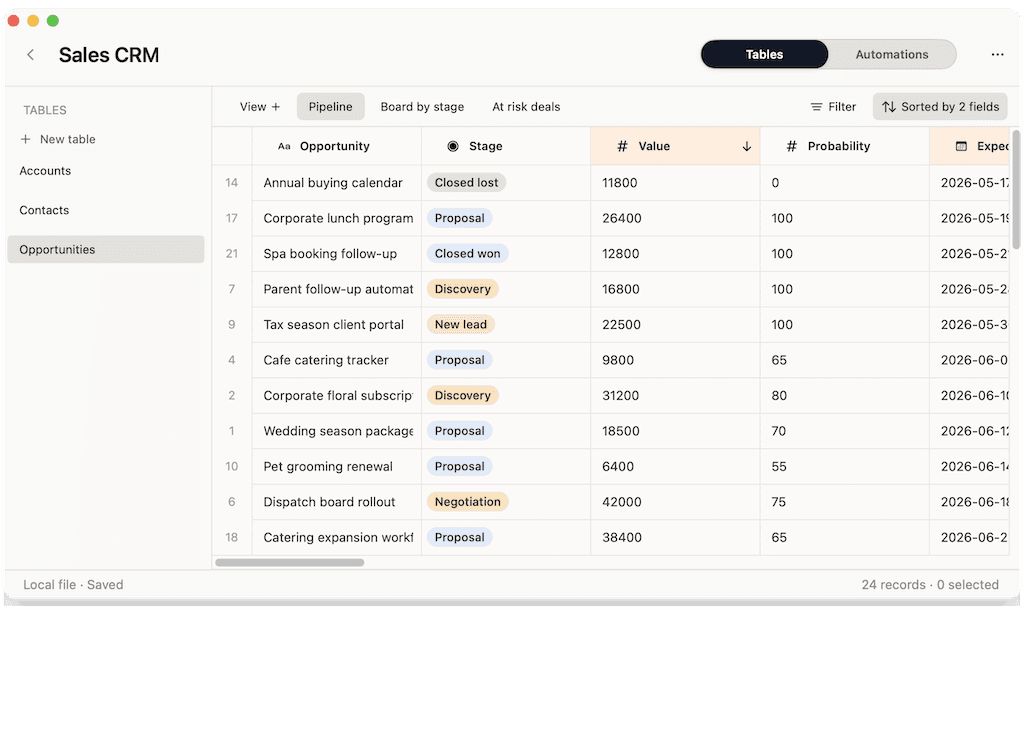
Same spreadsheet-to-workflow idea. The difference is that Rows is being sunset and cloud-hosted, while Macrows stays private and local on your Mac.
| Feature | Macrows | Rows |
|---|---|---|
| Still available after May 31, 2026 | Yes | Winding down May 31, 2026 |
| Works fully offline on your Mac | Yes | Cloud-only |
| Your data stays on your device | Yes | Stored on Rows / Superhuman servers |
| Built-in AI | Free, local, unmetered | 5–1,000 AI tasks / mo, cloud |
| Edit like a familiar spreadsheet | Yes | Yes |
| Turn rows into CRMs, trackers & workflows | Yes | Yes |
| Native macOS app (not a browser tab) | Yes | No |
| Per-seat pricing | No — free, no per-seat | From $8 / user / mo |
| Migration path for your data | Import CSV & Excel | Export to CSV / XLSX before shutdown |
| Price to get started | Free forever, no account | Free tier (ending) |
You picked Rows to turn a spreadsheet into a workflow. With Rows winding down, Macrows gives you that same idea — privately, on your Mac, without the metered AI or per-seat bill.
Rows winds down on May 31, 2026 and accounts on rows.com will be deleted. Macrows runs locally on your Mac, so there's no server that can be switched off.
Rows kept every spreadsheet in its cloud. Macrows is local-first — your records, notes, and customers stay on your device.
Rows capped AI Analyst tasks per month per plan. Macrows cleans rows, summarizes records, and extracts data on-device with no per-task limits.
Rows charged from $8 per user each month. Macrows is free to start with no account, and Pro sharing is free during beta.
Import the CSV and Excel files you export from Rows and keep working the way you already do — add structure only where you need it.
A real native app with fast keyboard-driven editing — not another browser tab fighting for memory.
Your Rows data is exportable until May 31, 2026. Moving it onto your Mac takes four steps.
Rows was acquired by Superhuman and is being sunset, with rows.com fully winding down on May 31, 2026. After that date, remaining accounts and data are permanently deleted, so export your spreadsheets first.
Macrows is a strong fit for Rows users who want to keep spreadsheet-to-workflow automation but run it privately. It turns the same kind of sheets into CRMs, trackers, and workflows as a free, local-first Mac app.
Rows was a cloud web app with metered AI tasks and per-seat pricing. Macrows is a native macOS app that keeps data on your device, runs free local AI, and has no per-seat fees.
Yes. Macrows is free forever for local work with no account, while Rows charged from $8 per user each month for its paid plans. Macrows Pro sharing is also free during beta.
For most spreadsheet-to-workflow use, yes. Export your Rows data as CSV or XLSX, import it into Macrows, and rebuild your trackers and CRMs with free on-device AI handling cleanup and summaries.
Export each Rows spreadsheet as XLSX and each table as CSV before May 31, 2026, download Macrows for Mac, import the files, and rebuild your workflows locally.
Teams that want a fully cloud-hosted, browser-based workspace with live API data connectors and broad third-party integrations may prefer Coda, the successor Rows recommends. Macrows is for everything you want to keep private and local on your Mac.
Download Macrows free, import your Rows exports, and keep your data on your Mac.